https://blog.ianli.site/2013/09/build-php-and-extension-for-windows/
在Windows下给PHP装扩展的难度不怎么好衡量。要说难的话,流行的扩展一般都有编译好的库,下回来用就是,方便的很;要说简单的话,下载扩展的PHP版本、线程安全设置、调试设置、编译器版本都要符合才能用,然后从VC11(VS 2012)开始PHP 5.4、5.5又有了32位和64位的分别……就算像Xdebug这样的流行扩展,也得防着一不留神下错了文件——当然,这只是略麻烦一点,不过对于一些不怎么流行的扩展,在Windows上安装还真是不简单的活:嗯,最麻烦的就是,你得自己编译。
在Windows下编译PHP和扩展比*nix下麻烦很多。在*nix下,你需要的只是“phpize”、“./configure –enable-XXX”、“make”——在Windows下可没有phpize这么好用的东西。
需要的文件
· 编译器。这里以VC++ 11(Visual Studio 2012)为例,它可以编译PHP 5.5(官方支持)和5.4(可用)。对应地,VC++ 9(Visual Studio 2008 SP1,需要Windows SDK 6.1)可以编译PHP 5.4(官方支持)和5.3(官方支持)。PHP的官方Wiki上有详细的编译器支持列表(英文)。
· PHP源代码。推荐从官网下载。
· PHP SDK。需要从这里下载两个压缩包:deps-5.5-vc11-x86.7z(下载对应版本的依赖包)和 php-sdk-binary-tools-20110915.zip(sdk,有更新的文件可以下新的)。
· PHP扩展的源码和依赖文件,如果你需要编译PHP扩展。
编译步骤
1. 准备工作文件夹
把压缩包php-sdk-binary-tools-20110915.zip的内容解压到一个文件夹,例如 D:\php-sdk\。
打开“VS2012 x86 Native Tools Command Prompt”,cd到刚刚建立的文件夹,执行以下命令:
setpath=%path%;D:\php\php-sdk\bin
bin\phpsdk_setvars.bat
bin\phpsdk_buildtree.batphpdev
把D:\php-sdk\phpdev\下的vc9文件夹复制一份,重命名为vc11。(不复制直接改名也可以,或者直接在vc9里面编译应该也没问题。)现在你应该有了一个类似这样的文件夹结构:
D:\php-sdk\
|--bin\
|--phpdev\
| |--vc6\
| |--vc8\
| |--vc9\
| | |--x64\
| | |--x86\
| | |--deps\
| |--vc11\
| |--x64\
| |--x86\
| |--deps\
| |--bin\
| |--include\
| |--lib\
|--script\
|--share\
把依赖包deps-5.5-vc11-x86.7z解压到D:\php-sdk\phpdev\vc11\x86\,将其中的deps文件夹与现有的deps文件夹合并。这个文件夹用来放置编译PHP和扩展需要的依赖文件,包括库文件、头文件甚至是依赖的二进制文件。
把php的源代码压缩包的内容解压到D:\php-sdk\phpdev\vc11\x86\,得到一个类似D:\php-sdk\phpdev\vc11\x86\php-5.5.3-src\的文件夹。
2. 生成configure脚本
cd到D:\php-sdk\phpdev\vc11\x86\php-5.5.3-src\,执行以下命令:
buildconf
3. 配置编译选项
使用–help查看可用的选项。下面是一个我用的开启了大多数PHP自带扩展的命令。
configure--help
configure--enable-cli-win32 --with-bz2 --with-curl --with-dba --enable-fileinfo--with-gettext --with-gmp --with-ldap --enable-mbstring --enable-mbregex--with-mcrypt --with-openssl --with-pgsql --enable-sockets --with-sqlite3--with-config-file-scan-dir --with-tidy --enable-exif --with-mysql--with-mysqli --enable-pdo --with-pdo-mysql --with-pdo-pgsql --with-pdo-sqlite--enable-soap --with-xmlrpc --with-xsl
4. 编译PHP
运行下面两条命令,编译PHP、生成zip压缩包。
nmake
nmake snap
这时报错:
d:\php\php-sdk\phpdev\vc11\x64\php-5.6.30\zend\zend_execute.h(247): warning C42
67: “函数”:从“size_t”转换到“int”,可能丢失数据
ext\calendar\easter.c(115): warning C4244: “=”: 从“time_t”转换到“long”,
可能丢失数据
french.c
gregor.c
jewish.c
ext\calendar\jewish.c :warning C4819: 该文件包含不能在当前代码页(936)中表示的字
符。请将该文件保存为 Unicode 格式以防止数据丢失
ext\calendar\jewish.c(346): error C2001: 常量中有换行符
ext\calendar\jewish.c(347): error C2001: 常量中有换行符
ext\calendar\jewish.c(365): error C2001: 常量中有换行符
ext\calendar\jewish.c(366): error C2001: 常量中有换行符
ext\calendar\jewish.c(368): error C2001: 常量中有换行符
NMAKE : fatal error U1077:“"E:\Program Files (x86)\Microsoft Visual Studio 11.
0\VC\BIN\amd64\cl.exe"”:返回代码“0x2”
Stop.
原因是ext\calendar\jewish.c文件编码问题,用notepad++编辑,编码->转为UTF-8编码格式,即可继续编译。
继续编译,报如下错误:
E:\Program Files(x86)\Microsoft Visual Studio 11.0\VC\INCLUDE\wtime.inl(35) : w
arning C4133: “函数”:从“consttime_t *”到“const __time32_t *”的类型不兼容
E:\Program Files(x86)\Microsoft Visual Studio 11.0\VC\INCLUDE\wtime.inl(41) : w
arning C4133: “函数”:从“consttime_t *”到“const __time32_t *”的类型不兼容
E:\Program Files(x86)\Microsoft Visual Studio 11.0\VC\INCLUDE\sys/stat.inl(42)
: error C2466: 不能分配常量大小为0 的数组
E:\Program Files(x86)\Microsoft Visual Studio 11.0\VC\INCLUDE\sys/stat.inl(47)
: error C2466: 不能分配常量大小为0 的数组
E:\Program Files(x86)\Microsoft Visual Studio 11.0\VC\INCLUDE\sys/utime.inl(37)
: error C2466: 不能分配常量大小为 0 的数组
E:\Program Files(x86)\Microsoft Visual Studio 11.0\VC\INCLUDE\sys/utime.inl(42)
: error C2466: 不能分配常量大小为 0 的数组
E:\Program Files(x86)\Microsoft Visual Studio 11.0\VC\INCLUDE\sys/utime.inl(47)
: error C2466: 不能分配常量大小为 0 的数组
E:\Program Files(x86)\Microsoft Visual Studio 11.0\VC\INCLUDE\sys/utime.inl(76)
: error C2466: 不能分配常量大小为 0 的数组
E:\Program Files(x86)\Microsoft Visual Studio 11.0\VC\INCLUDE\time.inl(30) : wa
rning C4244: “函数”:从“time_t”转换到“__time32_t”,可能丢失数据
E:\Program Files(x86)\Microsoft Visual Studio 11.0\VC\INCLUDE\time.inl(36) : wa
rning C4133: “函数”:从“consttime_t *”到“const __time32_t *”的类型不兼容
E:\Program Files(x86)\Microsoft Visual Studio 11.0\VC\INCLUDE\time.inl(42) : wa
rning C4133: “函数”:从“consttime_t *”到“const __time32_t *”的类型不兼容
E:\Program Files(x86)\Microsoft Visual Studio 11.0\VC\INCLUDE\time.inl(49) : wa
rning C4133: “函数”:从“consttime_t *”到“const __time32_t *”的类型不兼容
E:\Program Files(x86)\Microsoft Visual Studio 11.0\VC\INCLUDE\time.inl(55) : wa
rning C4133: “函数”:从“consttime_t *”到“const __time32_t *”的类型不兼容
E:\Program Files(x86)\Microsoft Visual Studio 11.0\VC\INCLUDE\time.inl(62) : wa
rning C4133: “函数”:从“consttime_t *”到“const __time32_t *”的类型不兼容
E:\Program Files(x86)\Microsoft Visual Studio 11.0\VC\INCLUDE\time.inl(67) : wa
rning C4133: “函数”:从“consttime_t *”到“const __time32_t *”的类型不兼容
E:\Program Files(x86)\Microsoft Visual Studio 11.0\VC\INCLUDE\time.inl(79) : wa
rning C4133: “函数”:从“time_t*”到“__time32_t*”的类型不兼容
NMAKE : fatal error U1077:“"E:\Program Files (x86)\Microsoft Visual Studio 11.
0\VC\BIN\cl.exe"”:返回代码“0x2”
Stop.
用notepad++编辑E:\Program Files (x86)\Microsoft VisualStudio 11.0\VC\include\ malloc.h头文件
第43行
/* _STATIC_ASSERT is forenforcing boolean/integral conditions at compile time. */
#ifndef _STATIC_ASSERT
#define_STATIC_ASSERT(expr) typedef char __static_assert_t[ (expr) ]
#endif
临时改为
/* _STATIC_ASSERT is forenforcing boolean/integral conditions at compile time. */
#ifndef _STATIC_ASSERT
//#ifdef PHP_EXTENSION
#define_STATIC_ASSERT(expr) typedef char __static_assert_t[ (expr)?(expr):1 ]
//#else
//#define_STATIC_ASSERT(expr) typedef char __static_assert_t[ (expr) ]
//#endif
#endif
解决,继续编译。
又报错如下(可能会报一系列这类错误,至少删除对应目录下的.obj文件,重现编译即可):
x64\Release_TS\ext\calendar\jewish.obj :fatal error LNK1112: 模块计算机类型“X86”与目标计算机类型“x64”冲突
ext\xsl\xsltprocessor.c(846): warning C4267: “=”: 从“size_t”转换到“int”,
可能丢失数据
rc /fo x64\Release_TS\php5ts.dll.res /dFILE_DESCRIPTION="\"PHP Script I
nterpreter\"" /d FILE_NAME="\"php5ts.dll\""/d PRODUCT_NAME="\"PHP Script Inter
preter\"" /Ix64\Release_TS /dMC_INCLUDE="\"x64\Release_TS\wsyslog.rc\"" win32
\build\template.rc
Microsoft (R) Windows (R)Resource Compiler Version 6.2.9200.20789
Copyright (C) MicrosoftCorporation. All rights reserved.
已复制 1 个文件。
x64\Release_TS\ext\calendar\jewish.obj: fatal error LNK1112: 模块计算机类型“X8
6”与目标计算机类型“x64”冲突
NMAKE : fatal error U1077:“"E:\Program Files (x86)\Microsoft Visual Studio 11.
0\VC\BIN\amd64\cl.exe"”:返回代码“0x2”
Stop.
至此编译成功。
接下来打包
nmake snap
但又报错了:
/out:x64\Release_TS\deplister.exe
x64\Release_TS\deplister.obj
imagehlp.lib
rd /s /q x64\Release_TS\php-5.6.30
系统找不到指定的文件。
rd /s /q x64\Release_TS\pecl-5.6.30
系统找不到指定的文件。
del /f /q x64\Release_TS\php-5.6.30-Win32-VC11-x64.zip
找不到d:\php\php-sdk\phpdev\vc11\x64\php-5.6.30\x64\Release_TS\php-5.6.30-Win32
-VC11-x64.zip
del /f /qx64\Release_TS\php-debug-pack-5.6.30-Win32-VC11-x64.zip
找不到d:\php\php-sdk\phpdev\vc11\x64\php-5.6.30\x64\Release_TS\php-debug-pack-5
.6.30-Win32-VC11-x64.zip
del /f /qx64\Release_TS\pecl-5.6.30-Win32-VC11-x64.zip
找不到d:\php\php-sdk\phpdev\vc11\x64\php-5.6.30\x64\Release_TS\pecl-5.6.30-Win3
2-VC11-x64.zip
x64\Release_TS\php.exe -ddate.timezone=UTC -n -dphar.readonly=0 win32/b
uild/mkdist.php"x64\Release_TS" "D:\php\php-sdk\phpdev\vc11\x64\deps""php5ts.d
ll" "php-cgi.exephp.exe php-win.exe" "php_curl.dll php_fileinfo.dll php_gd2.dll
php_opcache.dll " " ""D:\php\php-sdk\phpdev\vc11\x64\deps\template"
NMAKE : fatal error U1077: “x64\Release_TS\php.exe”:返回代码“0xc0000138”
Stop.
搜解决方案,php官方:
http://news.php.net/php.bugs/208408
https://bugs.php.net/bug.php?id=74398
去掉--with-openssl编译:
configure--enable-cli-win32 --with-bz2 --with-curl --with-dba --enable-fileinfo--with-gettext --with-gmp --with-ldap --enable-mbstring --enable-mbregex--with-mcrypt --with-openssl --with-pgsql--enable-sockets --with-sqlite3 --with-config-file-scan-dir --with-tidy--enable-exif --with-mysql --with-mysqli --enable-pdo --with-pdo-mysql--with-pdo-pgsql --with-pdo-sqlite --enable-soap --with-xmlrpc --with-xsl
于是,执行:
nmake clean
buildconf--force
configure--help
D:\php\php-sdk\phpdev\vc11\x64\php-5.6.30>configure--help
Options that enableextensions and SAPI will accept 'yes' or 'no' as a
parameter. They also accept'shared' as a synonym for 'yes' and request a
shared build of thatmodule. Not all modules can be built as shared modules;
configure will display[shared] after the module name if can be built that
way.
--enable-snapshot-build Build a snapshot; turns on everything itcan
and ignoresbuild errors
--enable-one-shot Optimize for fast build - best forrelease and
snapshot builders,not so hot for
edit-and-rebuild hacking
--with-cygwin Path to cygwin utilities onyour system
--enable-object-out-dir Alternate location for binary objectsduring
build
--enable-debug Compile with debugging symbols
--enable-debug-pack Release binaries with external debugsymbols
(--enable-debugmust not be specified)
--enable-pgi Generate PGO instrumentedbinaries
--with-pgo Compile optimized binariesusing training data
from folder
--disable-zts Thread safety
--with-prefix where PHP will be installed
--with-mp Tell VC9+ use up to[n,auto,disable] processes
for compilation
--with-php-build Path to where you extracted thedevelopment
libraries
(http://wiki.php.net/internals/windows/libs).
Assumes that itis a sibling of this source
dir (..\deps)if not specified
--with-extra-includes Extra include path to use whenbuilding
everything
--with-extra-libs Extra library path to use whenlinking
everything
--disable-ipv6 Disable IPv6 support (defaultis turn it on if
available)
--enable-fd-setsize Set maximum number of sockets forselect(2)
--with-snapshot-template Path to snapshot builder template dir
--disable-security-flags Disable the compiler security flags
--with-analyzer Enable static analyzer. Pass vsfor Visual
Studio, pvs forPVS-Studio
--with-aolserver Build AOLserver support
--enable-apache Build Apache 1.3.x version ofPHP
--with-apache-includes Where to find Apache 1.3 headers
--with-apache-libs Where to find Apache 1.3 libraries
--enable-apache2filter Build Apache 2.x filter
--enable-apache2-2filter Build Apache 2.2.x filter
--enable-apache2handler Build Apache 2.x handler
--enable-apache2-2handler Build Apache 2.2.x handler
--enable-apache2-4handler Build Apache 2.4.x handler
--with-apache-hooks Build Apache 1.3.x (hooks) versionof PHP
--disable-cgi Build CGI version of PHP
--disable-cli Build CLI version of PHP
--enable-crt-debug Enable CRT memory dumps fordebugging sent to
STDERR
--enable-cli-win32 Build console-less CLI version of PHP
--enable-embed Embedded SAPI library
--enable-isapi Build ISAPI version of PHP
--enable-nsapi Build NSAPI forNetscape/iPlanet/SunONE
webservers
--with-nsapi-includes Where to find NSAPI headers
--with-nsapi-libs Where to find NSAPI libraries
--enable-phpdbg Build phpdbg
--enable-phpdbgs Build phpdbg shared
--with-pi3web Pi3Web
--disable-bcmath bc style precision math functions
--without-beast for beast support
--disable-beast enable beast support
--enable-beast-debug enable beast debug mode
--with-bz2 BZip2
--disable-calendar calendar conversion support
--disable-com-dotnet COM and .Net support
--disable-ctype ctype
--with-curl cURL support
--with-dba DBA support
--with-enchant Enchant Support
--without-ereg POSIX extended regularexpressions
--enable-fileinfo fileinfo support
--disable-filter Filter Support
--disable-ftp ftp support
--without-gd Bundled GD support
--without-t1lib t1lib support
--without-libvpx vpx support
--with-gettext gettext support
--with-gmp Include GNU MP support.
--disable-hash enable hash support
--with-mhash mhash support
--without-iconv iconv support
--with-imap IMAP Support
--with-interbase InterBase support
--enable-intl Enable internationalizationsupport
--disable-json java script Object Serializationsupport
--with-ldap LDAP support
--with-libmbfl use external libmbfl
--enable-mbstring multibyte string functions
--enable-mbregex multibyte regex support
--disable-mbregex-backtrack check multibyte regex backtrack
--with-mcrypt mcrypt support
--with-mssql mssql support
--with-dblib mssql support with freetds
--without-mysqlnd Mysql Native Client Driver
--with-oci8 OCI8 support
--with-oci8-11g OCI8 support using Oracle 11gInstant Client
--with-oci8-12c OCI8 support using OracleDatabase 12c Instant
Client
--disable-odbc ODBC support
--with-odbcver Force support for the passedODBC version. A
hex number isexpected, default 0x0300. Use
the specialvalue of 0 to prevent an explicit
ODBCVER to bedefined.
--disable-opcache whether to enable Zend OPcachesupport
--with-openssl OpenSSL support
--with-pgsql PostgreSQL support
--with-pspell pspell/aspell (whatever it'scalled this
month) support
--disable-session session support
--enable-shmop shmop support
--with-snmp SNMP support
--enable-sockets SOCKETS support
--with-sqlite3 SQLite 3 support
--with-config-file-scan-dir Dir to check for additional php ini files
--with-sybase-ct SYBASE_CT support
--with-tidy TIDY support
--disable-tokenizer tokenizer support
--disable-zip ZIP support
--disable-zlib ZLIB support
--without-libxml LibXML support
--without-dom DOM support
--enable-exif exif
--with-mysql MySQL support
--with-mysqli MySQLi support
--enable-pdo Enable PHP Data Objectssupport
--with-pdo-dblib freetds dblib (Sybase, MS-SQL)support for PDO
--with-pdo-mssql Native MS-SQL support for PDO
--with-pdo-firebird Firebird support for PDO
--with-pdo-mysql MySQL support for PDO
--with-pdo-oci Oracle OCI support for PDO
--with-pdo-odbc ODBC support for PDO
--with-pdo-pgsql PostgreSQL support for PDO
--with-pdo-sqlite for pdo_sqlite support
--with-pdo-sqlite-external for pdo_sqlite support from an external dll
--disable-phar disable phar support
--enable-phar-native-ssl enable phar with native OpenSSL support
--without-simplexml Simple XML support
--enable-soap SOAP support
--without-wddx WDDX support
--without-xml XML support
--disable-xmlreader XMLReader support
--with-xmlrpc XMLRPC-EPI support
--disable-xmlwriter XMLWriter support
--with-xsl xsl support
D:\php\php-sdk\phpdev\vc11\x64\php-5.6.30>
configure--enable-cli-win32 --with-bz2 --with-curl --with-dba --enable-fileinfo--with-gettext --with-gmp --with-ldap --enable-mbstring --enable-mbregex--with-mcrypt --with-pgsql --enable-sockets --with-sqlite3--with-config-file-scan-dir --with-tidy --enable-exif --with-mysql--with-mysqli --enable-pdo --with-pdo-mysql --with-pdo-pgsql --with-pdo-sqlite--enable-soap --with-xmlrpc --with-xsl
又抛出这个错误:
D:\php\php-sdk\phpdev\vc11\x64\php-5.6.30>configure--enable-cli-win32 --with-bz
2 --with-curl --with-dba--enable-fileinfo --with-gettext --with-gmp --with-ldap
--enable-mbstring --enable-mbregex--with-mcrypt --with-pgsql --enable-sockets
--with-sqlite3--with-config-file-scan-dir --with-tidy --enable-exif --with-mysq
l --with-mysqli--enable-pdo --with-pdo-mysql --with-pdo-pgsql --with-pdo-sqlite
--enable-soap --with-xmlrpc --with-xsl
Saving configure options toconfig.nice.bat
Checking for cl.exe...
Detected compiler MSVC11 (Visual C++ 2012)
Detected 64-bit compiler
Checking for link.exe... E:\Program Files (x86)\MicrosoftVisual Studio 11.0\V
C\BIN\amd64
Checking for nmake.exe...
Checking for lib.exe...
Checking for bison.exe...
ERROR: bison is required
执行下句解决:
setpath=%path%;D:\php\php-sdk\bin
继续编译,nmake snap,又报如下错误:
Copying php_opcache.dllfrom x64\Release_TS to x64\Release_TS/php-5.6.30/ext
WARNING: distro depends onmsvcr110.dll, but could not find it on your system
WARNING: distro depends oniphlpapi.dll, but could not find it on your system
WARNING: distro depends onnormaliz.dll, but could not find it on your system
Array
(
[0] =>D:\php\php-sdk\phpdev\vc11\x64\deps\template/ssl
)
Generating pharcommand.phar
adding clicommand.inc
addingdirectorygraphiterator.inc
addingdirectorytreeiterator.inc
addinginvertedregexiterator.inc
adding phar.inc
adding pharcommand.inc
Creating phar.phar.bat
cd x64\Release_TS\php-5.6.30
zip.exe -9 -q -r..\php-5.6.30-Win32-VC11-x64.zip .
cd ..\..
cd x64\Release_TS\pecl-5.6.30
NMAKE : fatal error U1077: “cd”:返回代码“0x1”
Stop.
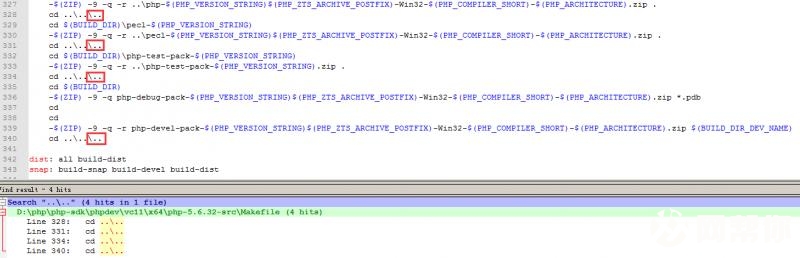
编辑源代码根目录下的Makefile文件,在"..\.."后加上"\.."保存,再继续nmake snap打包:
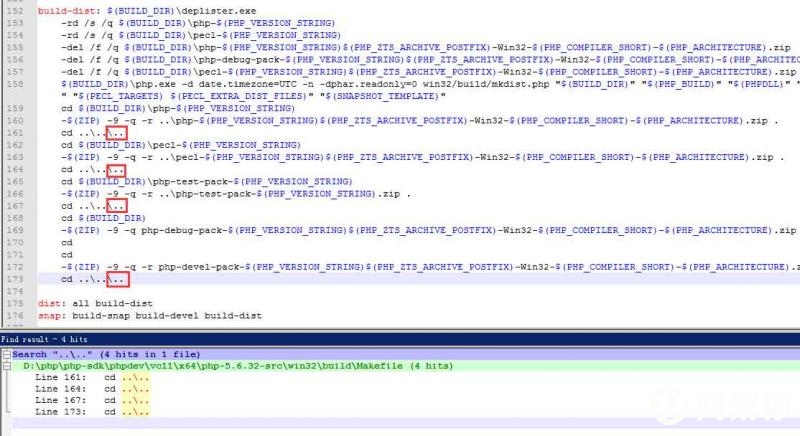
彻底解决这个问题:编辑D:\php\php-sdk\phpdev\vc11\x64\php-5.6.32-src\win32\build\ Makefile文件:
最终完成。
D:\php\php-sdk\phpdev\vc11\x64\php-5.6.32-src>nmakesnap
Microsoft (R) 程序维护实用工具11.00.50727.1 版
版权所有 (C) MicrosoftCorporation。保留所有权利。
SET PATH=E:\Program Files(x86)\Microsoft Visual Studio 11.0\Common7\IDE
\CommonExtensions\Microsoft\TestWindow;E:\ProgramFiles (x86)\Microsoft Visual S
tudio11.0\VC\BIN\amd64;C:\Windows\Microsoft.NET\Framework64\v4.0.30319;C:\Windo
ws\Microsoft.NET\Framework64\v3.5;E:\ProgramFiles (x86)\Microsoft Visual Studio
11.0\VC\VCPackages;E:\Program Files(x86)\Microsoft Visual Studio 11.0\Common7\
IDE;E:\Program Files(x86)\Microsoft Visual Studio 11.0\Common7\Tools;C:\Program
Files (x86)\HTML Help Workshop;E:\ProgramFiles (x86)\Microsoft Visual Studio 1
1.0\Team Tools\PerformanceTools\x64;E:\Program Files (x86)\Microsoft Visual Stu
dio 11.0\TeamTools\Performance Tools;C:\Program Files (x86)\Windows Kits\8.0\bi
n\x64;C:\Program Files (x86)\WindowsKits\8.0\bin\x86;C:\Program Files (x86)\Mic
rosoftSDKs\Windows\v8.0A\bin\NETFX 4.0 Tools\x64;C:\Program Files (x86)\Microso
ftSDKs\Windows\v7.0A\Bin\x64;C:\Program Files (x86)\Microsoft SDKs\Windows\v8.0
A\bin\NETFX 4.0Tools;C:\Program Files (x86)\Microsoft SDKs\Windows\v7.0A\Bin\;C
:\ProgramData\Oracle\Java\javapath;C:\ProgramFiles (x86)\Intel\iCLS Client\;C:\
Program Files\Intel\iCLSClient\;C:\Windows\system32;C:\Windows;C:\Windows\Syste
m32\Wbem;C:\Windows\System32\WindowsPowerShell\v1.0\;C:\ProgramFiles\Intel\Inte
l(R) Management EngineComponents\DAL;C:\Program Files (x86)\Intel\Intel(R) Mana
gement EngineComponents\DAL;C:\Program Files\Intel\Intel(R) Management Engine C
omponents\IPT;C:\ProgramFiles (x86)\Intel\Intel(R) Management Engine Components
\IPT;E:\Program Files(x86)\Microsoft SQL Server\100\Tools\Binn\;E:\Program File
s\Microsoft SQLServer\100\Tools\Binn\;E:\Program Files\Microsoft SQL Server\100
\DTS\Binn\;C:\Program Files(x86)\Microsoft ASP.NET\ASP.NET Web Pages\v1.0\;C:\P
rogram Files\Microsoft SQLServer\110\Tools\Binn\;C:\Program Files\dotnet\bin;C:
\Program Files(x86)\Microsoft SDKs\TypeScript\1.0\;E:\Program Files (x86)\PuTTY
\;C:\ProgramFiles\Microsoft\Web Platform Installer\;.;E:\Program Files (x86)\Ja
va\jdk1.8.0_112\bin;C:\ProgramFiles\TortoiseSVN\bin;C:\Program Files\Microsoft
Network Monitor3\;E:\Golang\Go\bin;C:\Program Files\Git\bin;E:\Program Files\Ap
ache SoftwareFoundation\apache-ant\bin;E:\Program Files\Apache Software Foundat
ion\apache-maven\bin;C:\ProgramFiles\MySQL\MySQL Utilities 1.6\;%SONAR_SCANNER_
MSBUILD%;C:\Program Files(x86)\GtkSharp\2.12\bin;E:\Program Files\TortoiseGit\b
in;E:\Users\Administrator\.gradle\wrapper\dists\gradle-3.5-bin\daoimhu7k5rlo48nt
mxw2ok3e\gradle-3.5\bin;E:\ProgramFiles\nodejs\;E:\Python\Python36\Scripts\;E:\
Python\Python36\;.;E:\sonar\v6.x\sonarqube-6.2\bin;E:\sonar\v6.x\sonar-scanner-2
.8\bin;E:\Program Files(x86)\Microsoft VS Code\bin;C:\Program Files\Mono\bin;D:
\php-sdk\bin;E:\ProgramFiles\CMake\bin;E:\ffmpeg\ffmpeg-3.3.3-win64-static\bin;
C:\Users\Administrator\AppData\Roaming\npm;D:\php\php-sdk\bin;D:\php\php-sdk\php
dev\vc11\x64\deps\bin
Microsoft (R) 程序维护实用工具11.00.50727.1 版
版权所有 (C) MicrosoftCorporation。保留所有权利。
已复制 1 个文件。
正在创建库 x64\Release_TS\php5ts.lib和对象x64\Release_TS\php5ts.exp
for %T in (php.exe) do "E:\ProgramFiles (x86)\Microsoft Visual Studio 1
1.0\VC\BIN\amd64\nmake.exe"/I /nologo "%T"
D:\php\php-sdk\phpdev\vc11\x64\php-5.6.32-src>"E:\ProgramFiles (x86)\Microsoft
Visual Studio11.0\VC\BIN\amd64\nmake.exe" /I /nologo "php.exe"
正在创建库 x64\Release_TS\php.lib 和对象x64\Release_TS\php.exp
SAPI sapi\cli buildcomplete
for %T in (php_beast.dll) do"E:\Program Files (x86)\Microsoft Visual St
udio 11.0\VC\BIN\amd64\nmake.exe"/I /nologo "%T"
D:\php\php-sdk\phpdev\vc11\x64\php-5.6.32-src>"E:\ProgramFiles (x86)\Microsoft
Visual Studio11.0\VC\BIN\amd64\nmake.exe" /I /nologo "php_beast.dll"
正在创建库x64\Release_TS\php_beast.lib 和对象 x64\Release_TS\php_beast.exp
EXT beast build complete
for %T in () do "E:\Program Files(x86)\Microsoft Visual Studio 11.0\VC\
BIN\amd64\nmake.exe"/I /nologo "%T"
x64\Release_TS\php_beast.lib
已复制 1 个文件。
rd /s /q x64\Release_TS\php-5.6.32
rd /s /q x64\Release_TS\pecl-5.6.32
del /f /qx64\Release_TS\php-5.6.32-Win32-VC11-x64.zip
del /f /qx64\Release_TS\php-debug-pack-5.6.32-Win32-VC11-x64.zip
找不到D:\php\php-sdk\phpdev\vc11\x64\php-5.6.32-src\x64\Release_TS\php-debug-pa
ck-5.6.32-Win32-VC11-x64.zip
del /f /qx64\Release_TS\pecl-5.6.32-Win32-VC11-x64.zip
找不到D:\php\php-sdk\phpdev\vc11\x64\php-5.6.32-src\x64\Release_TS\pecl-5.6.32-
Win32-VC11-x64.zip
x64\Release_TS\php.exe -ddate.timezone=UTC -n -dphar.readonly=0 win32/b
uild/mkdist.php"x64\Release_TS" "D:\php\php-sdk\phpdev\vc11\x64\deps""php5ts.d
ll""php.exe" "php_beast.dll " " ""D:\php\php-sdk\phpdev\vc11\x64\deps\template
"
Making dist forx64\Release_TS
Copying php.exe fromx64\Release_TS to x64\Release_TS/php-5.6.32
Copying php_beast.dll fromx64\Release_TS to x64\Release_TS/php-5.6.32/ext
WARNING: distro depends onmsvcr110.dll, but could not find it on your system
WARNING: distro depends oniphlpapi.dll, but could not find it on your system
Array
(
[0] => D:\php\php-sdk\phpdev\vc11\x64\deps\template/ssl
)
cd x64\Release_TS\php-5.6.32
zip.exe -9 -q -r..\php-5.6.32-Win32-VC11-x64.zip .
cd ..\..\..
cd x64\Release_TS\pecl-5.6.32
zip.exe -9 -q -r..\pecl-5.6.32-Win32-VC11-x64.zip .
zip error: Nothing to do!(try: zip -9 -q -r ..\pecl-5.6.32-Win32-VC11-x64.zip .
-i .)
cd ..\..\..
cd x64\Release_TS\php-test-pack-5.6.32
zip.exe -9 -q -r ..\php-test-pack-5.6.32.zip.
cd ..\..\..
cd x64\Release_TS
zip.exe -9 -qphp-debug-pack-5.6.32-Win32-VC11-x64.zip *.pdb
zip error: Nothing to do!(php-debug-pack-5.6.32-Win32-VC11-x64.zip)
cd
D:\php\php-sdk\phpdev\vc11\x64\php-5.6.32-src\x64\Release_TS
cd
D:\php\php-sdk\phpdev\vc11\x64\php-5.6.32-src\x64\Release_TS
zip.exe -9 -q -rphp-devel-pack-5.6.32-Win32-VC11-x64.zip php-5.6.32-dev
el-VC11-x64
cd ..\..\..
D:\php\php-sdk\phpdev\vc11\x64\php-5.6.32-src>
最后在D:\php-sdk\phpdev\vc11\x86\php-5.5.3-src\Release_TS\下得到一个压缩包php-5.5.3-Win32-VC11-x86.zip,即是我们编译并打包好的PHP。把这个压缩包解压到别处即可开始使用;如果运行时提示需要某dll,一般在D:\php-sdk\phpdev\vc11\x86\deps\bin\下面可以找到它。
我按照上面的配置参数,打包了一份可用的PHP 5.3.3,可以到我的SkyDrive下载。相关的配置命令和phpinfo可以在这里查看。
5. 编译PHP扩展
PHP扩展的编译方式和PHP的编译方式大同小异。
首先确定扩展的源代码和依赖文件已经正确放在了相关文件夹。扩展的源代码文件夹需要放在D:\php-sdk\phpdev\vc11\x86\php-5.5.3-src\ext\下,依赖文件的位置和编译PHP时相同。
然后清理一下上次编译的工作文件夹,因为我们要调整配置选项(–force选项可以不带)。
nmake clean
buildconf--force
configure--help
这次我要编译的是PHP扩展test_helpers,一个添加了一些用于测试的函数的扩展。比如说,通过这个扩展,你可以重载exit()、die()系统函数和new关键字,在为一些遗留代码编写测试时非常好用。
可以看到,buildconf之后,configure –help输出的选项里已经有了–enable-test_helpers。
//configure--disable-all --enable-cli --enable-test_helpers=shared
configure--disable-all --enable-cli --without-beast --enable-beast=shared
D:\php\php-sdk\phpdev\vc11\x64\php-5.6.30>configure --disable-all --enable-cli -
-without-beast--enable-beast=shared
Saving configure options toconfig.nice.bat
Checking for cl.exe...
Detected compiler MSVC11 (Visual C++ 2012)
Detected 64-bit compiler
Checking for link.exe... E:\Program Files (x86)\MicrosoftVisual Studio 11.0\V
C\BIN\amd64
Checking for nmake.exe...
Checking for lib.exe...
Checking for bison.exe...
Checking for re2c.exe...
Detected re2c version 0.13.5
Checking for zip.exe...
Checking for lemon.exe...
Checking for mc.exe... C:\Program Files (x86)\WindowsKits\8.0\bin\x64
Checking for mt.exe... C:\Program Files (x86)\WindowsKits\8.0\bin\x64
Build dir: x64\Release_TS
PHP Core: php5ts.dll and php5ts.lib
Checking for wspiapi.h...
Enabling IPv6 support
Enabling SAPI sapi\cli
Enabling extensionext\beast [shared]
Enabling extension ext\date
Enabling extension ext\ereg
Enabling extension ext\pcre
Enabling extensionext\reflection
Enabling extension ext\spl
Checking fortimelib_config.h ... ext/date/lib
Enabling extensionext\standard
Creating build dirs...
Generating files...
Generating Makefile
Generating main/internal_functions.c
[content unchanged; skipping]
Generatingmain/config.w32.h
Generating phpize
Done.
Enabled extensions:
-----------------------
| Extension | Mode |
-----------------------
| beast | shared |
| date | static |
| ereg | static |
| pcre | static |
| reflection | static |
| spl | static |
| standard | static |
-----------------------
Enabled SAPI:
-------------
| Sapi Name |
-------------
| cli |
-------------
----------------------------------------------
| | |
----------------------------------------------
| Build type | Release |
| Thread Safety | Yes |
| Compiler | MSVC11 (Visual C++ 2012) |
| Architecture | x64 |
| Optimization | PGO disabled |
| Static analyzer |disabled |
----------------------------------------------
Type 'nmake' to build PHP
D:\php\php-sdk\phpdev\vc11\x64\php-5.6.30>
nmake
我禁用了所有的其他扩展,只保留了命令行(CLI)的SAPI。标记为shared表示编译动态链接库,与static相对。
在configure输出的末尾是当前编译配置的状态:
编译出来的文件同样在Release_TS文件夹下。和我们需要的扩展有关的是四个文件:php_test_helpers.dll,php_test_helpers.dll.res,php_test_helpers.exp和php_test_helpers.lib。
复制php_test_helpers.dll到你的PHP的ext目录,修改你的php.ini,添加extension=php_test_helpers.dll,再执行一下php -m看一下加载的模块: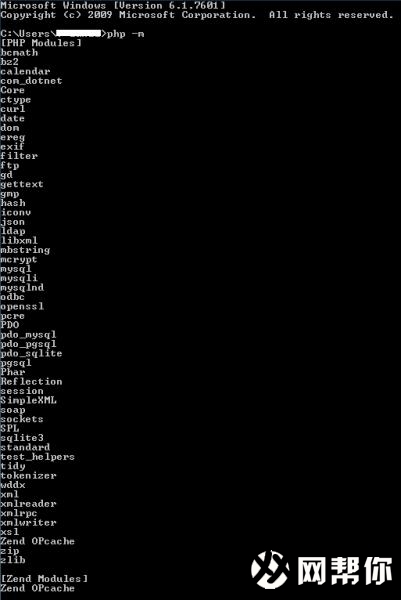
可以看出……test_helpers已经加载了。
这儿有个问题,这样编译出来的php_test_helpers.dll不能作为Zend Extension被加载——在Ubuntu下是可以的,我还没搞清楚原因,调查中……有了结果我再来更新这段。根据作者SebastianBergmann(牛人啊,也是phpunit的作者)的说明,由于都重载了ZEND_NEW的关系,test_helpers和Xdebug(等类似扩展)有些兼容问题,workaround是作为Zend Extension并且在Xdebug之后加载。下图展示了在Ubuntu上开启了workaround和在Windows上未开启workaround的phpinfo()信息。

我打包了一份编译出来的test_helpers,可以到我的SkyDrive下载(为PHP 5.5-线程安全-VC11-非调试发布版本-32位而编译,其他版本不保证可用)。下载之后可以跑一下我的TestHelpers.php项目里面的示例和单元测试来验证。 (由于上文所述的原因,执行单元测试时请禁用代码覆盖率检测和Xdebug。)
参考
· PHP Wiki: Build your own PHP on Windows(英文)